How-to: A Reddit Ticker with Simple JavaScript
Recently I’ve really enjoyed creating simple javascript components using a ruby-inspired coding style. This is a walkthrough of creating a such a component that uses this style.
Code: github
Intro
This ruby-inspired coding style is basically using nested functions in a way that approximates class behavior in ruby:
function SomeClass (opts) {
    var self = this,
        private_instance_var = 'string';

    function initialize () {
      self.public_instance_var = 42;
      // ...

    }

    self.public_method = function () {
      // ...
    }

    function private_method () {
      // ...

    }

    initialize();
    return self;
  }
When a new instance of the “class” is created, initialize() is run just like in ruby when you instantiate a class.
Friendly warning: instantiation of objects built this way will be considerably slower than if methods were defined using prototype. While clean, pretty, and awesome, this style should probably not be used for objects that need to be repeatedly instantiated.
Step Negative One
We’re going to create a small div that cycles through the top posts in a given subreddit. We’ll use jQuery because it makes life easy.
To get started, we can create the skeleton html, css, and js files we’ll need, and link them all together… Or- to quickly get off the ground we can just start with a Base JS App.
Otherwise, you could easily create your own files, or use the excellent HTML5 Boilerplate, just be prepared to handle your own web serving and make sure the files reference each other correctly.
Structure + Basic Requirements
If you use Base JS App, this is approximately what your public directory should look like (I’ve omitted some things we won’t be using):
|-- css
  |   |-- base.css
  |   `-- style.css
  |-- index.html
  |-- js
  |   |-- libs
  |   |   `-- jquery-1.5.min.js
  |   |-- plugins.js
  |   `-- script.js
  `-- json
      `-- example.json
And this is approximately what the html should look like (omitted some lines here as well):
<!-- /index.html -->

  <!doctype html>

  <head>
    <title></title>

    <link rel="stylesheet" href="/css/base.css">

    <link rel="stylesheet" href="/css/style.css">
  </head>

  <body>
    <div id="container">
      <header>
      </header>

      <div id="main">
      </div>

      <footer>

      </footer>
    </div> <!-- end of #container -->

    <script src="/js/libs/jquery-1.5.min.js"></script>

    <script src="/js/plugins.js"></script>
    <script src="/js/script.js"></script>

  </body>
  </html>
One more thing, as we build this module up, we’ll be testing its output in the javascript console. So if you’re using Firefox, that means using firebug and its console, otherwise use Chrome and its javascript console.
A Quick Conceptual Outline:
1) We need a div where this stuff will go. Let’s call this div #reddit_reader.
2) We need to use ajax to get the jsonp from reddit.
3) Once the data is returned, we will create a bunch of hidden child divs in #reddit_reader — one for each post. Each child div will contain the title/link to the content and a link to the comments.
4) We’ll cycle through these child/post divs, revealing one post at a time. Forever.
5+) From there we could have it refresh every once in awhile, pause on mouseover, manual advance, or take a list of subreddits and mix them, but lets not get ahead of ourselves just yet.
Step One
In index.html we will add a div with an id of “reddit_reader”. I chose to do it in #main, but feel free to be an iconoclast.
<!-- /index.html -->

  <div id="main">

    <div id="reddit_reader"></div>
  </div>
Part one is short.
Step Two
Now, let’s put down a base:
// js/script.js

  function RedditReader (opts) {
    var self = this;

    function init (opts) {

    }

    init(opts);
    return self;
  }


  $(document).ready(function() {

  });
Also, we have the jQuery’s “ready” block at the bottom, which is where we’ll actually instantiate stuff.
Oh and we changed the name of the object to “RedditReader”.
To the AJAX
Let’s create an instance of RedditReader and have it grab reddit post data via AJAX.
Note the url we’re passing to the instance — we’ve jsonp-ified it by adding “?jsonp=?” to the end. Many APIs that return json will also give the option to return jsonp (reddit, twitter, facebook to name a few), but they can differ in how you specify that you would like jsonp returned instead of regular json. Since Reddit’s method is by using the parameter “jsonp” setting its value to your callback of choice, we will request the callback to be “?” so that jQuery will auto-detect that it’s jsonp and will parse it correctly for us.
// js/script.js
  function RedditReader (opts) {
    if (! (this instanceof arguments.callee)) {
        return new arguments.callee(arguments);
    }
    var self = this;

    function init (opts) {
      self.url = opts.url;
      get_data(data_ready);
    }

    // create "get_data" method

    function get_data (cb) {
      // get the remote data (jsonp)
      // and call "data_ready" method when finished
      $.getJSON(self.url, data_ready);
    }

    // create "data_ready" method
    // this method is called when data is returned

    function data_ready (data) {
      // lets output to console to see what we get
      console.log(data);
    }

    init(opts);
    return self;
  }

  $(document).ready(function() {
    // create an instance, passing in url and target div

    // we'll make this into jQuery plugin later
    var reddit_reader = new RedditReader({
      target: $('#reddit_reader'),
      url: 'http://www.reddit.com/r/programming.json?jsonp=?'

    });
  });
If we start the browser up and check the console, we should see that jQuery was nice enough to go fetch the list of top posts in r/programming:
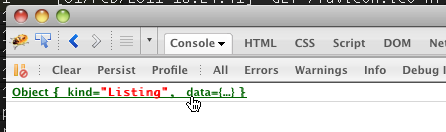
Feel free to click around and explore the structure of that object. Alternatively, view the json itself: http://www.reddit.com/r/programming.json
Now that we’re getting the data from reddit ok, it’s time for…
Step Three
In the previous section we set our reddit_reader up to get the data through an ajax call. Let’s process that data.
Data Processing
In this section we’re going to want to create a child div for each top post. Before we do that, let’s process the data a bit, storing what we need in a way that’s closer to how we’ll use it.
// js/script.js

  ...

    // create "data_ready" method
    // this method is called when data is returned

    function data_ready (data) {
      process_remote_data(data);

      // verify things went according to plan
      // and that we've stored
      console.log("self.post_data: ", self.post_data);
    }

    // create a method to process the remote data

    function process_remote_data (data) {
      // create an empty array where we'll store the posts data
      self.post_data = [];

      // no we iterate over the remote data, creating post objects
      // and adding them to the array we just created

      $.each(data.data.children, function(i, remote_post) {
        // create a temporary object

        var local_post = {};

        // use it to store the properties of interest
        local_post.title = remote_post.data.title;
        local_post.url = remote_post.data.url;
        local_post.comments_link = 'http://reddit.com' + remote_post.data.permalink;
        local_post.num_comments = remote_post.data.num_comments;
        local_post.user = remote_post.data.author;
        local_post.score = remote_post.score;

        // store that object in our post_data array
        self.post_data.push(local_post);
      });
    }

  ...
Checking your console you should see something like:

What we did here is create a new method “process_remote_data” and call it from “data_ready”. “process_remote_data” iterates through the remote data object we got from reddit and stores the relevant bits in “self.post_data” for our use later.
Using the processed data
That later is now. Let’s use that array of post data to create some child divs that will let us actually interact with these posts.
We’ll use jQuery to construct the html elements for us. Pretty simple, create a div and anchor tags, set them up with the right values, and stick them where they need to go. At the end of the day everything goes into self.target which is #reddit_reader.
// js/script.js

  ...

    // this method is called when data is returned
    function data_ready (data) {
      process_remote_data(data);
      create_post_elements();
    }

    // create a method to create post elements
    function create_post_elements () {
      // create an array to store our elements

      self.post_elements = [];

      // iterate over our stored post data
      // create dom elements
      // append them to our target div
      $.each(self.post_data, function(i, post) {
        var post_element = $('<div/>', {
              'class': 'rr_reddit_post',
              'id': 'reddit_post_' + i
            }),

            title_div = $('<div/>', {
              'class': 'rr_title'

            }),
            title_link = $('<a/>', {
              'href': post.url,
              'class': 'rr_title_link',
              'text': post.title,
              'target': '_blank'

            }),

            comments_div = $('<div/>', {
              'class': 'rr_comments'
            }),
            comments_link = $('<a/>', {
              'href': post.comments_link,
              'class': 'rr_comments_link',
              'text': '( '+post.num_comments+' comments )',
              'target': '_blank'

            }),

            user_div = $('<div/>', {
              'class': 'rr_user'
            }),
            user_link = $('<a/>', {
              'href': 'http://reddit.com/user/'+post.user,
              'class': 'rr_user_link',
              'text': post.user,
              'target': '_blank'

            });


        title_div.append(title_link);
        comments_div.append(comments_link);
        user_div.append('posted by ').append(user_link);

        post_element.append(title_div);
        post_element.append(comments_div);
        post_element.append(user_div);

        post_element.hide();

        self.target.append(post_element);

        // add it to our self.post_elements array
        self.post_elements.push(post_element);
      });
    }
  ...
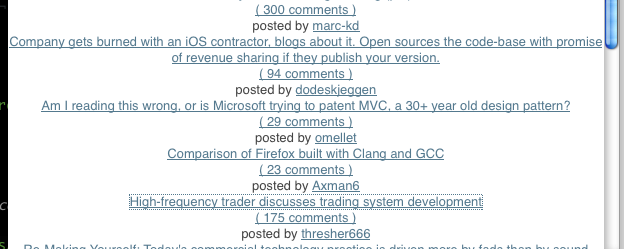
This is what the page should look like:
and if you were to inspect in firebug:
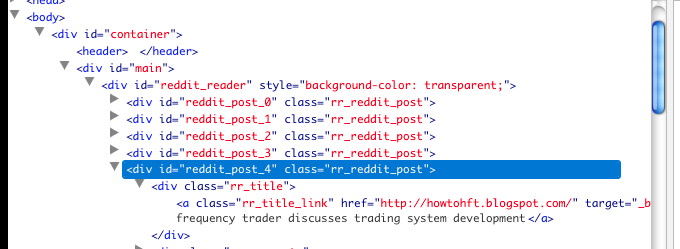
Excellent! Now we have everything on the page, now lets make it do what it’s supposed to.
Step Four
All that’s left now is to make the post elements fade in/out one at a time on a loop. Also, we should add some styling.
Let’s tackle the fade first.
Onwards to Fading
First, we want all of these child post divs to start hidden. To do this we’ll add one line to “create_post_elements()” in the loop right before we append post_element to self.target.
// js/script.js

    ...

    function create_post_elements () {
      $.each(self.post_data, function(i, post) {
        // omitting stuff, see above...

        post_element.append(comments_link); // from above

        // Adding a line so that these posts start hidden
        post_element.hide();

        self.target.append(post_element); // from above
      });
    }

    ...
Great, now they start hidden. Let’s turn them on, one by one.
To do this we’ll create two methods: cycle_posts() and advance_post().
cycle_posts() is very thin. Basically it will just advance the post by calling advance_post() and then trigger a timeout followed by a call to itself again. This is the main fade cycle loop.
advance_post() has more to it. This method does a fades out on the last post we had showing, then does a fades in on the next one. To do this, we need to keep track of what we last showed (which, by the way, won’t exist if this is the first call) as well as what we want to show next.
// js/script.js

  ...

    function data_ready (data) {
      process_remote_data(data);
      create_post_elements();
      // add a call to the new "cycle_posts()"
      cycle_posts();
    }

    // the fade cycle "loop"

    function cycle_posts () {
      // advance the post we show
      advance_post();
      // wait 7000ms then do it again
      setTimeout(cycle_posts, 5000);
    }

    function advance_post () {
      // if this is the first run, next post will be the first one

      self.next_post_i = self.next_post_i || 0;

      // get a reference to the element
      self.next_post = self.post_elements[self.next_post_i];

      if (self.last_post) {
        // if there was a last post, this isn't the first run through
        // let's hide it before showing the next one

        self.last_post.fadeOut(function() {
          self.next_post.fadeIn();
        });

      } else {
        // first run through, no previous post to hide
        self.next_post.fadeIn();
      }

      // increment the index for next time
      self.next_post_i += 1;
      // ..and go back to 0 if we've gone through them all

      if (self.next_post_i >= self.post_elements.length) {
        self.next_post_i = 0;
      }

      // lets store the faded in element as self.last_post
      // so that we can fade it out on the next run-through
      self.last_post = self.next_post;
    }

  ...
Success! Of course in this case “Success!” means “functional”. One thing we should do is pause the ticker if you mouseover. I can imagine a user getting frustrated if the ticker changes right before they click.
Step Five
Pausing the ticker involves two event bindings: mouseover will set the “paused” flag, and mouseout will remove it. It also involves putting a check for the “paused” flag in the cycle_posts() loop.
We’ll create a new method set_binds() and call it from init(). That’s where we’ll bind the two mouse events.
// js/script.js
  ...

    function init (opts) {
      self.url = opts.url;
      self.target = opts.target;
      get_data(data_ready);
      set_binds();
    }

    function set_binds () {
      self.target.mouseover(function() {
        // set the "paused" flag

        self.paused = true;
        // what the hell, let's change the bg color too
        self.target.css('background-color', '#fffff5');
      });

      self.target.mouseout(function() {
        // and remove it

        self.paused = false;
        // and back again
        self.target.css('background-color', 'transparent');
      });
    }

  ...
Great, now we just check for that flag when we loop:
// js/script.js

  ...

    function cycle_posts () {
      // if we're not paused
      // advance the post we show

      if (!self.paused) {
        advance_post();
      }
      // wait 7000ms then do it again
      setTimeout(cycle_posts, 7000);
    }

  ...
Awesome, with a little bit of styling, we have a nice proggit ticker:
